> For the complete documentation index, see [llms.txt](https://docs.javsphere.com/llms.txt). Markdown versions of documentation pages are available by appending `.md` to page URLs; this page is available as [Markdown](https://docs.javsphere.com/javlis/how-it-works.md).
# How It Works
{% hint style="success" %}
* Official $JAVLIS contract address: [0x440D06b2aC83Ff743d9e149Be582A4b2b2c6adEc](https://basescan.org/address/0x440D06b2aC83Ff743d9e149Be582A4b2b2c6adEc)
* $JAVLIS token: [here](/javlis/buy-javlis.md)
{% endhint %}
{% hint style="info" %}
Experience xTrade under [https://app.leverageX.trade/](https://app.leveragex.trade/)
{% endhint %}
#### ✖️ What is xTrade?
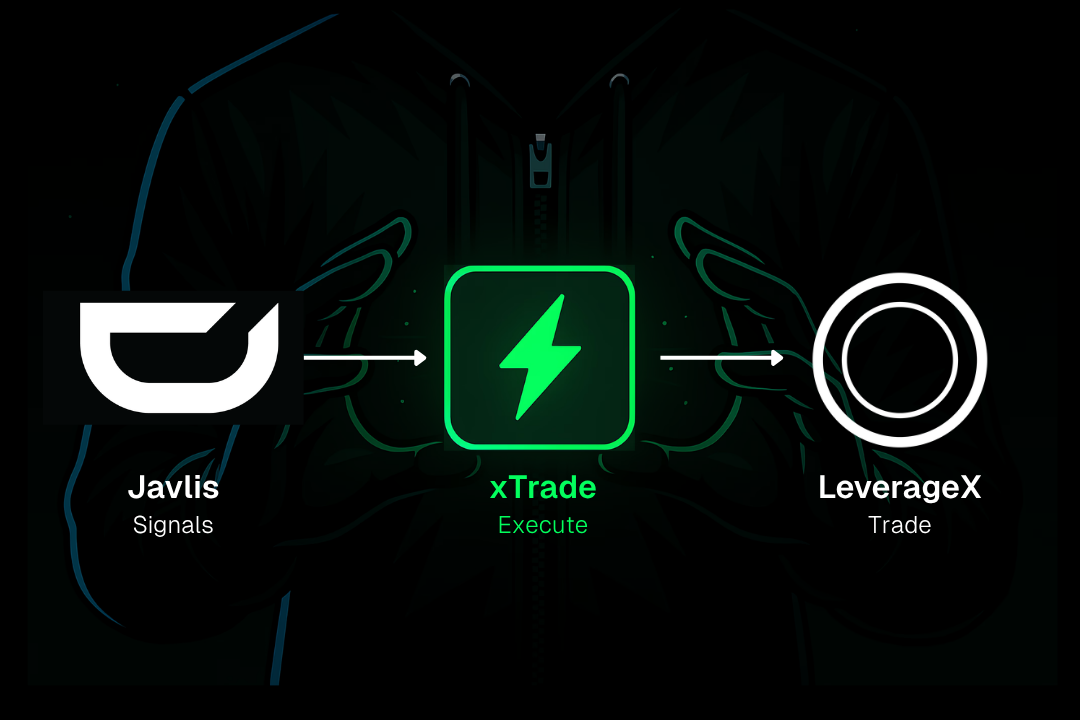
**xTrade** is the trade excecution engine that transforms AI-powered signals from JAVLIS into real leveraged trades. It's directly integrated into the LeverageX app.
Every xTrade setup is fully curated by JAVLIS, based on real-time inefficiencies and strategy logic. No searching. No guessing. Just act on the signal.
#### 🔍 Where to Find xTrade and How It Works
xTrade is an additional functionality **within the LeverageX app** ([app.leveragex.trade/](https://app.leveragex.trade/xtrade)). xTrade is located in the top-left area of the trading interface, between the “**Long**” and “**Short**” buttons.
#### ℹ️ How It Works
1. **Go to** [**app.leveragex.trade/**](https://app.leveragex.trade/xtrade)
2. **Connect your wallet**
3. **Click on the xTrade icon**
4. **JAVLIS will suggest the asset, direction (Long/Short), and leverage** based on [your level and unlocked modules](broken://pages/ctwqI0g8eU1HMoqodIiE). \
\
\
Click the "*Refresh*" icon to get a new suggestion.
5. **Review the setup**
6. **Click on xTrade** to execute, confirm the trade in your wallet (e.g. Metamask) and you're done
7. Watch your trade in your open positions at the bottom of the LeverageX page.
#### 👀 See all trading signals and select a trade
Click the “*Signals*” icon to view all signals generated by JAVLIS. Select any token to initiate a trade based on its current setup.
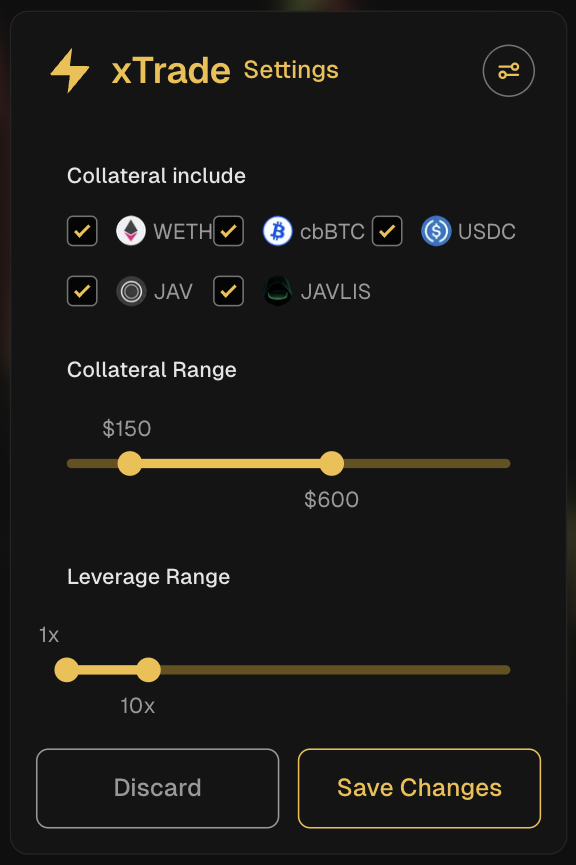
#### ⚙️ Customize xTrade
Click the "*Settings*" icon to cutomize:
* Collateral assets to be used
* Collateral Range in $
* Leverage Range
Click “*Save Changes*” and reopen the xTrade window to receive updated suggestions.
#### 💡 Why Use xTrade?
* ✅ One-click execution — zero friction.
* ✅ AI-driven trade setups — no chart-staring required.
* ✅ 100% on-chain. No middlemen.
* ✅ Trade crypto, forex, and stocks — all from one wallet.
* ✅ Powered by **JAVLIS**, the evolving AI agent built for real-world performance.
#### 🤖 Built on LeverageX
LeverageX is the decentralized leveraged trading platform powering xTrad
{% embed url="" %}
{% hint style="info" %}
Please refer to the [xTrade Terms of Use](/legal/terms-of-use/xtrade-module-terms.md).
{% endhint %}
{% embed url="" %}
* **Javlis on X**:
* **Javlis on Telegram**:
## Disclaimer
Trading involves substantial risk. Past performance is not indicative of future results.
Javlis does not provide investment advice, portfolio management, or discretionary trading.
All trades execute only under user control, within user-approved parameters, and on user-owned exchange accounts.
Users are responsible for maintaining sufficient margin and ensuring correct API configuration.
Javlis products and services are not available to U.S. persons or residents of restricted jurisdictions.
 is located in the top-left area of the trading interface, between the “**Long**” and “**Short**” buttons.
.png?alt=media&token=d49e854d-cdb9-45f3-b2e0-78e76d71636e)
 4. **JAVLIS will suggest the asset, direction (Long/Short), and leverage** based on [your level and unlocked modules](broken://pages/ctwqI0g8eU1HMoqodIiE). \
\
\
Click the "*Refresh*" icon
4. **JAVLIS will suggest the asset, direction (Long/Short), and leverage** based on [your level and unlocked modules](broken://pages/ctwqI0g8eU1HMoqodIiE). \
\
\
Click the "*Refresh*" icon  to get a new suggestion.
5. **Review the setup**
6. **Click on xTrade** to execute, confirm the trade in your wallet (e.g. Metamask) and you're done
7. Watch your trade in your open positions at the bottom of the LeverageX page.
#### 👀 See all trading signals and select a trade
Click the “*Signals*” icon
to get a new suggestion.
5. **Review the setup**
6. **Click on xTrade** to execute, confirm the trade in your wallet (e.g. Metamask) and you're done
7. Watch your trade in your open positions at the bottom of the LeverageX page.
#### 👀 See all trading signals and select a trade
Click the “*Signals*” icon  to view all signals generated by JAVLIS. Select any token to initiate a trade based on its current setup.
.png?alt=media&token=9164cf71-352d-4903-b18f-30a54a3141ca)
 to cutomize:
* Collateral assets to be used
* Collateral Range in $
* Leverage Range
Click “*Save Changes*” and reopen the xTrade window to receive updated suggestions.
to cutomize:
* Collateral assets to be used
* Collateral Range in $
* Leverage Range
Click “*Save Changes*” and reopen the xTrade window to receive updated suggestions.